
The way people discover information online is changing rapidly. Alongside traditional search engines, AI assistants and automated agents are increasingly being used to find, understand, summarize, and retrieve information from websites. Because of this shift, website owners are exploring new ways to organize their most valuable content so that it can be easier for machines and people to understand.
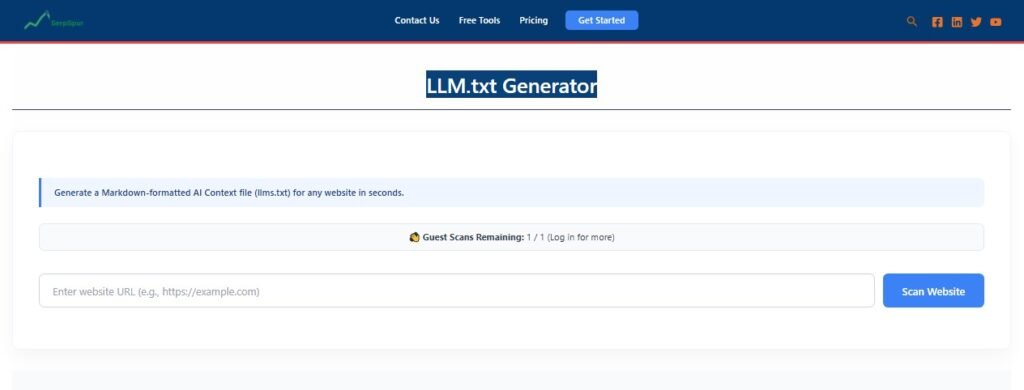
The SerpSpur LLM.txt Generator provides a simple way to create an llms.txt file that organizes important website resources in a structured Markdown format. It can help website owners create a curated content map without having to manually build the file from scratch.
What Is an LLM.txt Generator?
An LLM.txt Generator is a tool that helps create an llms.txt file for a website. The llms.txt proposal describes a Markdown-based document that can provide AI systems with a concise overview of a website and links to useful resources.
Modern websites can contain extensive navigation elements, scripts, advertisements, media, and large amounts of information. A carefully organized text file can provide a simpler representation of the content that a website considers important.
However, llms.txt should not be confused with a Google ranking requirement. Google has stated that websites do not need llms.txt for Google Search or its generative AI experiences. Therefore, website owners should consider it an additional AI-readiness and content-organization practice rather than a guaranteed SEO ranking method.
Why Create an LLM.txt File?
A website may contain hundreds or even thousands of URLs. Not every page is equally important for understanding a business, product, service, or organization.
An LLM Text File Generator can help you create a curated list of high-value resources. For example, a software company could organize links to:
Product documentation
Feature information
API documentation
Tutorials
Pricing details
Help resources
Important company information
The objective is to make key information easier to identify rather than simply listing every page available on the website.
SerpSpur LLM.txt Generator
Creating an llms.txt file manually is possible, but formatting and organizing content can become time-consuming, especially when working with multiple websites.
The SerpSpur LLM.txt Generator is designed to simplify this process. It provides a dedicated workflow for generating an LLM text file that can be reviewed and customized before being used on a website.
This can be useful for SEO professionals, freelancers, agencies, developers, SaaS companies, publishers, and website owners who want to experiment with structured AI-readable website information.
Focus on Important Website Content
A useful llms.txt file should be selective. Adding every URL simply because it exists can make the document unnecessarily large and less focused.
Before generating your file, consider which pages provide the clearest explanation of your website.
Ask yourself:
Which pages explain what the business does?
Which resources contain authoritative information?
Which documentation is most useful?
Which pages would help an AI system understand the products or services?
Are any important URLs outdated or duplicated?
This review process can help create a more meaningful content map.
LLM.txt, Sitemap.xml, and Robots.txt: What’s the Difference?
These files serve different purposes and should not be treated as interchangeable.
Robots.txt
robots.txt provides instructions related to crawler access and can be used to communicate which areas of a website crawlers should or should not access.
Sitemap.xml
A sitemap helps search engines discover URLs on a website. It can contain a broad collection of pages that website owners want search engines to find.
LLM.txt
An llms.txt file is intended to provide a concise, curated overview of useful website information for AI systems that choose to support or use the proposal.
As a result, creating an llms.txt file does not replace either robots.txt or a sitemap.
How to Create an Effective LLM.txt File
Generating the file is only part of the process. A strong implementation starts with careful content selection.
Step 1: Identify Key Pages
Make a list of pages that best represent your website, business, products, documentation, or services.
Step 2: Organize Related Resources
Group similar information into logical sections. For example, a SaaS website might have sections for Products, Documentation, Tutorials, Support, and Company Information.
Step 3: Remove Low-Value URLs
Avoid filling the file with duplicate, outdated, or unnecessary pages. Prioritize resources that provide useful context.
Step 4: Generate the File
Use the SerpSpur LLM.txt Generator to create the structured file.
Step 5: Review Before Publishing
Check every link and description for accuracy. Make sure the selected resources still represent your website correctly.
Step 6: Keep It Updated
Websites change frequently. When major documentation, products, services, or important pages change, review the llms.txt file as well.
Who Can Use an LLMs.txt Generator Tool?
An LLMs.txt generator tool can support several types of users.
Website Owners
Business owners can organize important company information, service pages, FAQs, guides, and resources.
SEO Professionals
SEO specialists can include the process within broader technical SEO and AI-readiness workflows.
Digital Agencies
Agencies managing multiple client websites can use a standardized generation and review process to reduce repetitive manual work.
SaaS Companies
Software companies often maintain extensive documentation. Organizing product guides, API resources, and support information can make their content structure easier to understand.
Developers and Documentation Teams
Teams responsible for technical documentation can use an llms.txt file as an additional way to highlight their most useful resources.
LLM.txt Is Not a Replacement for SEO
One of the most important points to understand is that an llms.txt file should complement—not replace—fundamental SEO practices.
Website owners should continue focusing on useful content, crawlable pages, internal linking, structured data where appropriate, technical performance, accessibility, and clear information architecture.
Similarly, creating an llms.txt file does not guarantee that ChatGPT, Claude, Gemini, or another AI system will read or use it. Adoption and implementation can vary between systems.
For this reason, the file is best viewed as an additional content-organization layer rather than a shortcut to search visibility.
Final Thoughts
The SerpSpur LLM.txt Generator offers a convenient way to create a structured llms.txt file for websites that want to explore AI-ready content organization. By highlighting important pages and grouping valuable resources, website owners can create a clearer representation of their site’s key information.